This Overview has the following sections:
Composites General Process
The Composites process group provides three alternative processes that model the process of laying up plies onto a mold:
-
Hand layup (default layup process): plies are laid up by one or more operators. For some parts, one or more cores are placed between ply layers. Multiple layers are laid up, and debulking (using a vacuum bag) is performed periodically, between layers. Setup options allow you to control when the first debulking occurs and how often subsequent debulks occur.
In addition to layup and debulking costs, the model for this process also includes costs for a vacuum drop test and for attaching thermocouples in preparation for autoclave curing.
The model calculates layup times from area-based layup rates that take into account the complexity of each ply. For parts with cores, the model includes potting costs for core regions that contain fastener holes. A setup option allows you to specify the number of fastener holes in the part (0, by default). The model also includes costs for core splicing, if necessary. A setup option allows you to specify the total length of the joints formed by core splicing for the part (also 0, by default).
-
Automated Fiber Placement (AFP): plies are laid up by a machine that uses spools of relatively narrow ply material (1/8”-1/2”). The cost model assumes that cores are not used with AFP. In addition to layup costs, the model for this process also includes programming costs, as well as costs for a vacuum drop test and for attaching thermocouples in preparation for autoclave curing.
The model calculates layup times from area-based layup rates that take into account the complexity of each ply. Layup times are also driven by the number of active machine spools. Setup options allow you to specify programming cost, as well as to override the calculated number of active spools.
-
Automated Tape Layup (ATL): plies are laid up by a machine that uses spools of relatively wide ply material (6”-12”). The cost model assumes that cores are not used with ATL. In addition to layup costs, the model for this process also includes programming costs, as well as costs for a vacuum drop test and for attaching thermocouples in preparation for autoclave curing.
The model calculates layup times from area-based layup rates that take into account the complexity of each ply.
Note: Hand layup is included by default in the routing for a Composites part. Users can manually include AFP or ATL instead. All three layup processes take into account tooling and materials costs; see Tooling for Composites and Materials for Composites.
-
Note: In the Composites interface and in this documentation, “mold” and “tool” generally refer to the same thing: the mold onto which plies are laid.
The process group also provides processes that model cutting plies from a roll (prior to hand layup), cleaning and preparing the mold, curing the part, removing the part from the mold, and inspecting the part:
-
Ultrasonic Cut: accounts for costs associated with unrolling, cutting, and splicing (if necessary) material in order to assemble ply kits for hand layup. It also accounts for identing and unloading plies.
Cutting time calculations are perimeter based. Cutting rate is taken from a machine property or setup option. Plies are assumed to be cut one at a time, by default, but a setup option allows you to specify the number of plies stacked up in order to be cut all at once. Cutting rate is adjusted when plies are stacked.
-
Tool Clean: accounts for costs associated with manual, laser, or cryogenic cleaning of the mold. For manual cleaning, the cost model also accounts for the cost of cleaning agent. The clean time calculation is area based.
-
Mold Preparation: accounts for costs associated with applying and curing some number of coats of mold release material, as well as costs associated with applying and curing tack. A setup option allows you to specify the number of mold-release coats. You can manually exclude tackifier application and curing.
Times are calculated based on mold area, as are consumable material costs for mold release and tackifier.
-
Autoclave Cure: accounts for costs associated with attaching and detaching thermocouples, loading and unloading the part, and curing the part with heat and pressure in an autoclave. A setup option allows you to specify that multiple parts cannot share the autoclave machine during a cycle, which affects overhead calculations. Multiple parts are assumed, by default, if they can fit in the machine.
-
Bench Operation: Tool Breakdown: accounts for costs associated with moving the part and tooling into the work cell, removing the vacuum bag, removing the part from the tool, and moving the empty tooling out of the work cell.
Moving and part-removal times are based on part and tool dimensions. A setup option allows you to override the calculated part removal time. Vacuum bag removal time is based on part perimeter.
-
Bench Operation: Final Inspection: accounts for costs associated with visually inspecting the finished part. Times are calculated based on part surface area.
These processes are followed by secondary processes, including Milling (on a 5-Axis Mill), Ultrasonic Scanning (C-Scan or A-Scan), and Manual Paint.
See Routing and Feasibility for Composites for more information.
Part Geometry for Composites
Geometry extraction for Composites parts recognizes some Composites-specific GCDs: Ply GCD and Core GCD. In addition, the Component GCD has several properties that are process-group-specific or have process-group-specific meanings.
Some of the Ply and Core properties are extracted from CAD file metadata (for example, the Material Name, Orientation, and Sequence for a given ply). A Composites Mapping File allows aPriori to convert the metadata into GCD property values that can be used by the cost model. The default mapping file supports CAD files that contain ply design data generated by one of the following:
-
CATIA with Fibersim
-
CATIA with CATIA CPD/CWB
-
NX™ with Fibersim
The Mapping File is a fully customizable XSLT file. If you need to support additional metadata formats, contact aPriori Professional Services.
Materials for Composites
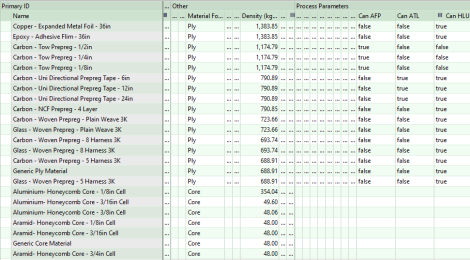
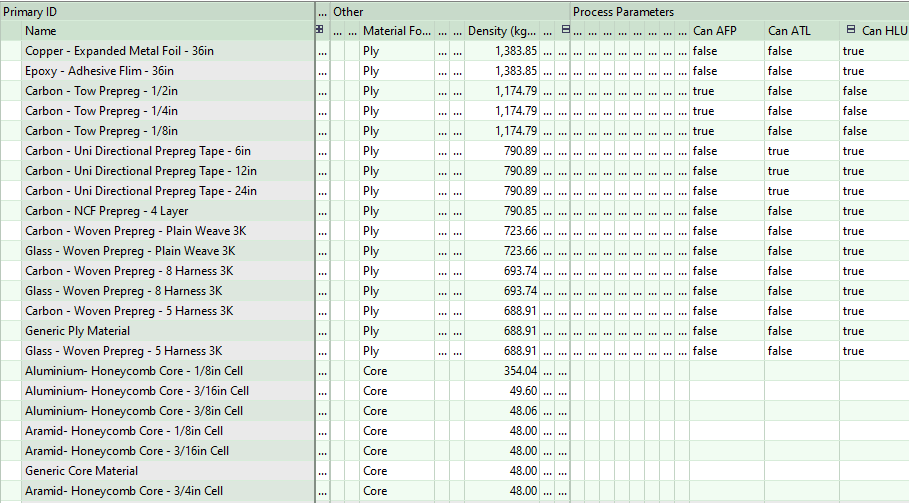
A composite part potentially uses multiple different types of material, since different plies or cores in the same part might use different material types. The name of the material used by a given ply or core is extracted from CAD file metadata, and that name is established as the value of the GCD property Material Name.
Because of this, when you cost a composite part, you don’t select a material in the Material Selection dialog. Instead, aPriori extracts the material type for each ply and core, and the cost model looks up material properties by material type in the material table for the current Digital Factory.
Note that aPriori converts the CAD file metadata into GCD property values with the help of a Composites mapping file. The default mapping file supports CAD files that contain ply design data generated by one of the following:
-
CATIA with Fibersim
-
CATIA with CATIA CPD/CWB
-
NX™ with Fibersim
If you need to support additional metadata formats, contact aPriori Professional Services.
Important ply material properties include the following:
-
Deformation Average Angle: used to help determine layup speed for Ply Placing operations.
-
Material Cost per Area: drives material costs.
-
Material Utilization: drives materials costs, as well as machine selection and setup costs for Ultrasonic Cut.
-
Material Width: drives times, costs and machine selection for automated layup processes as well as for Ultrasonic Cut.
Machines for Composites
Starting point Digital Factories provide the following machines:
-
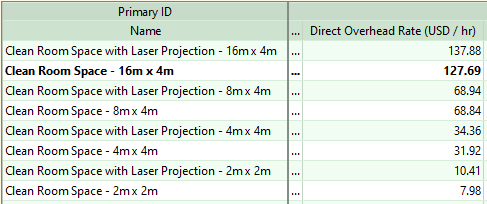
Virtual Hand Layup machines that represent ISO 7 clean rooms. They are provided with a range sizes, and with and without support for laser-projected layup guides:

-
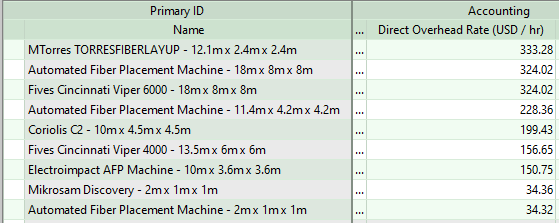
Automated Fiber Placement machines, with a range of sizes:

-
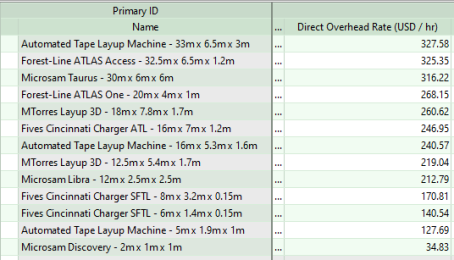
Automated Tape Layup machines, with a range of sizes:

-
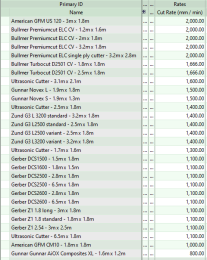
Ultrasonic Cut machines in a variety of sizes:
-
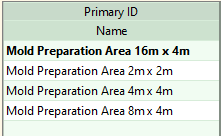
Mold Preparation virtual machines, which represent work areas in a range of sizes:


-
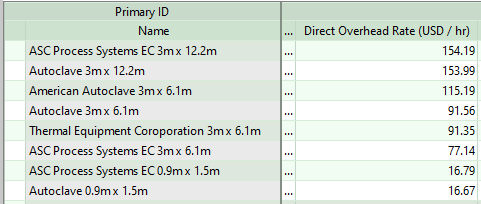
Autoclave Cure machines:

-
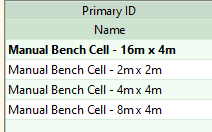
Bench Operation virtual machines, which represent work areas in a range of sizes:

-
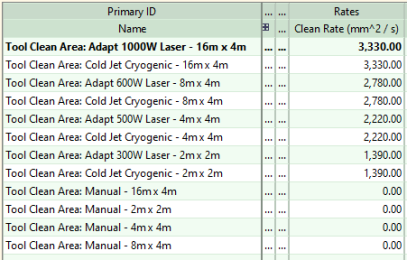
Tool Clean machines, which represent a work area (for manual cleaning) or a combination of a work area and a laser or cryogenic cleaning device:

See also Machine Selection for Composites.
Tooling for Composites
By default, hard tooling cost is calculated based on the following:
-
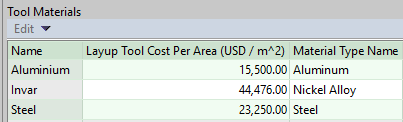
Tool material cost: looked up by the current tool material (see Layup Tool Material for Hand Layup, Layup Tool Material for ATL, and Layup Tool Material for AFP) in the Layup Tool Cost Per Area column of the tool shop Tool Materials table:

-
Tool surface area (see Tool Length, Width, and Area)
-
Tool shop variable Region Multiplier.
Each layup process provides a setup option that allows users to override the default on a per-part basis, and specify the tool cost explicitly:
-
Hand Layup: Layup Tool Cost Override
-
Automated Tape Layup: Layup Tool Cost Override
-
Automated Fiber Placement: Layup Tool Cost Override